
YouTube Shorts & Reels
Turn a script into dozens of 9:16 clips in one run.
Paste hundreds of prompts and press Start. AutoPrompt Flow runs every prompt on Google Flow for you, then auto-downloads each video and image into one folder, named and ready to edit.
No credit card needed · Free plan available
Features
Bulk generation, Veo automation and a Flow video downloader in one side panel. Set it up once and let the batch run.
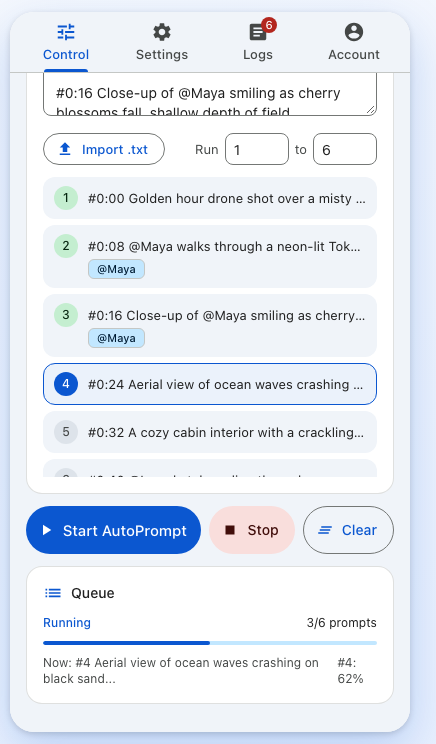
Paste 10, 100 or 1,000 prompts, or import a .txt file. The batch extension submits them one after another, so you can walk away while Flow works.
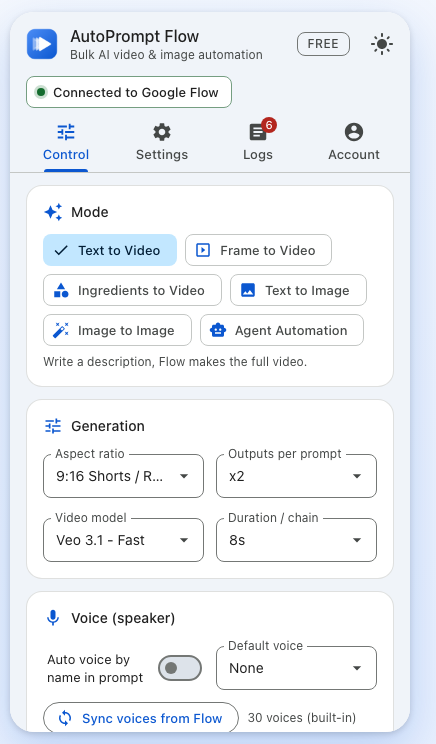
Auto Veo for text to video, frame to video and ingredients to video. Pick the Veo model, aspect ratio, length and outputs per prompt once, and every prompt in the queue uses them.
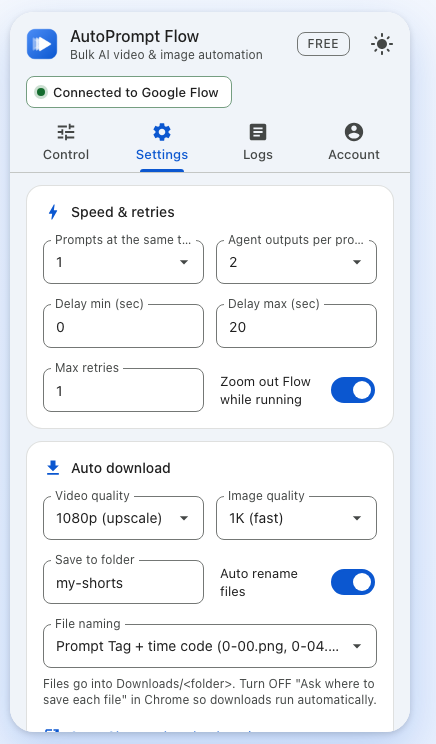
Every finished clip and image is saved to a folder you choose, at the quality you choose. No more clicking download on each result.
The same image automator for stills: text to image and image to image with Nano Banana, in bulk. Drop in reference images once and they're matched to prompts by name.
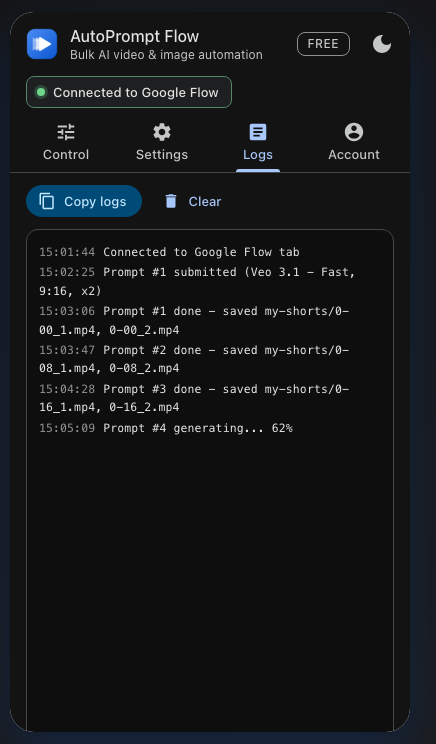
See the status of every prompt while the batch runs. Failed generations are retried automatically, and the log shows exactly what happened and where each file was saved.
The toolkit
Small things that add up when you make AI videos at scale.
Write @Name in a prompt and the right Flow character is picked. Voices can follow the speaker.
Start frames and ingredients are attached to the right prompt, by order or by name.
Each prompt can continue from the last frame or image of the one before it.
Run Flow's agent mode in bulk and auto-accept its confirmations.
Prompt tags like #0:04 become 0-04.mp4, so clips drop straight onto your edit.
Random pauses between prompts and automatic retries keep long batches moving.
If Flow's page changes, adjust the selectors in Advanced settings and keep going.
No analytics. Prompts and settings stay in your browser. Privacy policy.
How it works
Add AutoPrompt Flow from the Chrome Web Store and pin it to your toolbar.
Go to flow.google.com and sign in with your own Google account.
Open the side panel, pick a mode and model, add images if needed, and paste your prompts.
Leave the Flow tab open. Every result lands in your Downloads folder, named and in order.
Why automate
| Task | By hand in Flow | With AutoPrompt Flow |
|---|---|---|
| Run 100 prompts | Paste and click Generate 100 times | Paste once, press Start |
| Download results | Click download on every clip | Saved automatically, up to 4K |
| File names | Random names, renamed by hand | 0-04.mp4, matched to your timeline |
| Characters & voices | Picked again for every prompt | @Name picks them for you |
| Failed generations | Spot them and redo them | Retried automatically |
| Your time | Hours of clicking | A few minutes to set up |
Built for
Turn a script into dozens of 9:16 clips in one run.
Generate every scene of a video, named in timeline order.
Test many variations of a product shot with Nano Banana.
Keep characters consistent and extend scenes shot by shot.
Pricing
Start free. Upgrade when your batches get bigger.
Try Google Flow automation every day.
$0
Free forever
Add to ChromeUnlimited batches for a single project.
$1.99/ month
Billed monthly
Get MonthlyThe best price for regular creators.
$14.99/ year
$1.25 / month · Save 37%
Get YearlyPay once, automate forever.
$24.99once
One payment. No renewals.
Get Lifetime14-day money-back guarantee. Cancel anytime. Prices in USD. Every plan runs on your own Google Flow account and credits. Refund policy · Compare plans
Guides
Practical how-tos for making AI videos and images at scale.
FAQ
AutoPrompt Flow is a Chrome extension for Google Flow automation. You paste a list of prompts, press Start, and it runs them one by one on Google Flow, then downloads every video and image into a folder with clean file names.
Yes. AutoPrompt Flow has a free plan with 20 prompts a day for Text to Video and Text to Image, with auto-download in 720p and 1K. Pro unlocks unlimited prompts, every mode and downloads up to 4K.
Open Google Flow, open the AutoPrompt Flow side panel and choose Text to Image or Image to Image. Paste your prompts with one empty line between each, pick the model and image quality, then press Start. Every image is generated and saved to your folder automatically.
Yes. You can choose the Veo 3.1 models for video and the Nano Banana models for images, as long as they are available in your Google Flow account.
Yes. The auto download manager saves every finished video and image into a folder you choose inside Downloads: 720p video and 1K images on the Free plan, up to 4K with Pro. With Pro, start a prompt with a tag like #0:04 and the file is saved as 0-04.mp4.
No. AutoPrompt Flow saves your videos and images exactly as Google Flow delivers them. It does not edit files or remove watermarks, and any marks Google adds to AI-generated media stay in place.
It is a message from Google Flow itself, shown when it sees a lot of activity from your account in a short time. AutoPrompt Flow does not hide from or get around Google's limits. If you see it, stop the batch, wait a while, then run again with fewer prompts at the same time and a longer delay between prompts.
Yes. The extension works inside your own Google Flow account, so generations use your own Flow plan and credits. AutoPrompt Flow does not sell or provide Flow credits.
To click and type in Flow the same way you would, the extension uses Chrome's debugger permission on the Flow tab only. Chrome shows that bar while it is active. It is normal; if you press Cancel, the run stops.
No. AutoPrompt Flow has no analytics, and your prompts, settings and generated files stay on your device. The extension only talks to Google Flow.
Start free with 20 prompts a day. Monthly ($1.99) suits a single project, Yearly ($14.99) is the best price for regular creators, and Lifetime ($24.99) is one payment with no renewals. Every paid plan unlocks the same Pro features.
Yes. Every Pro plan has a 14-day money-back guarantee: email support@autopromptflow.com within 14 days of your first payment and you get a full refund, no questions asked. Renewals aren't refunded, so cancel before your renewal date if you don't want to continue.
Open the extension's Account tab and press Manage subscription (or go to our billing portal), sign in with the email you bought with, and cancel. You can also email support@autopromptflow.com. Pro stays active until the end of the period you paid for, then the extension goes back to the Free plan.
No. AutoPrompt Flow is an independent tool and is not affiliated with or endorsed by Google. Google Flow, Veo and Nano Banana are trademarks of Google LLC.
Install AutoPrompt Flow and run your first Google Flow batch in a couple of minutes.